I've spent the last while rebuilding the back office for TCG Bling, a print-on-demand trading card business. Artists supply original artwork; the shop turns each artwork into a family of products: the same painting framed half a dozen ways, printed as different game tokens, listed as separate items with separate variants. Years of organic growth meant the store had thousands of listings, the business had folders of original art, and almost nothing recorded which listing came from which artwork.
That link matters. Royalties hang off it. Automation hangs off it. You cannot regenerate a product, retire a duplicate, or pay an artist correctly if you don't know whose painting is under the frame.
So: match a few thousand product photos to a few hundred source artworks. A human can do it. A human also has opinions about spending their week that way.
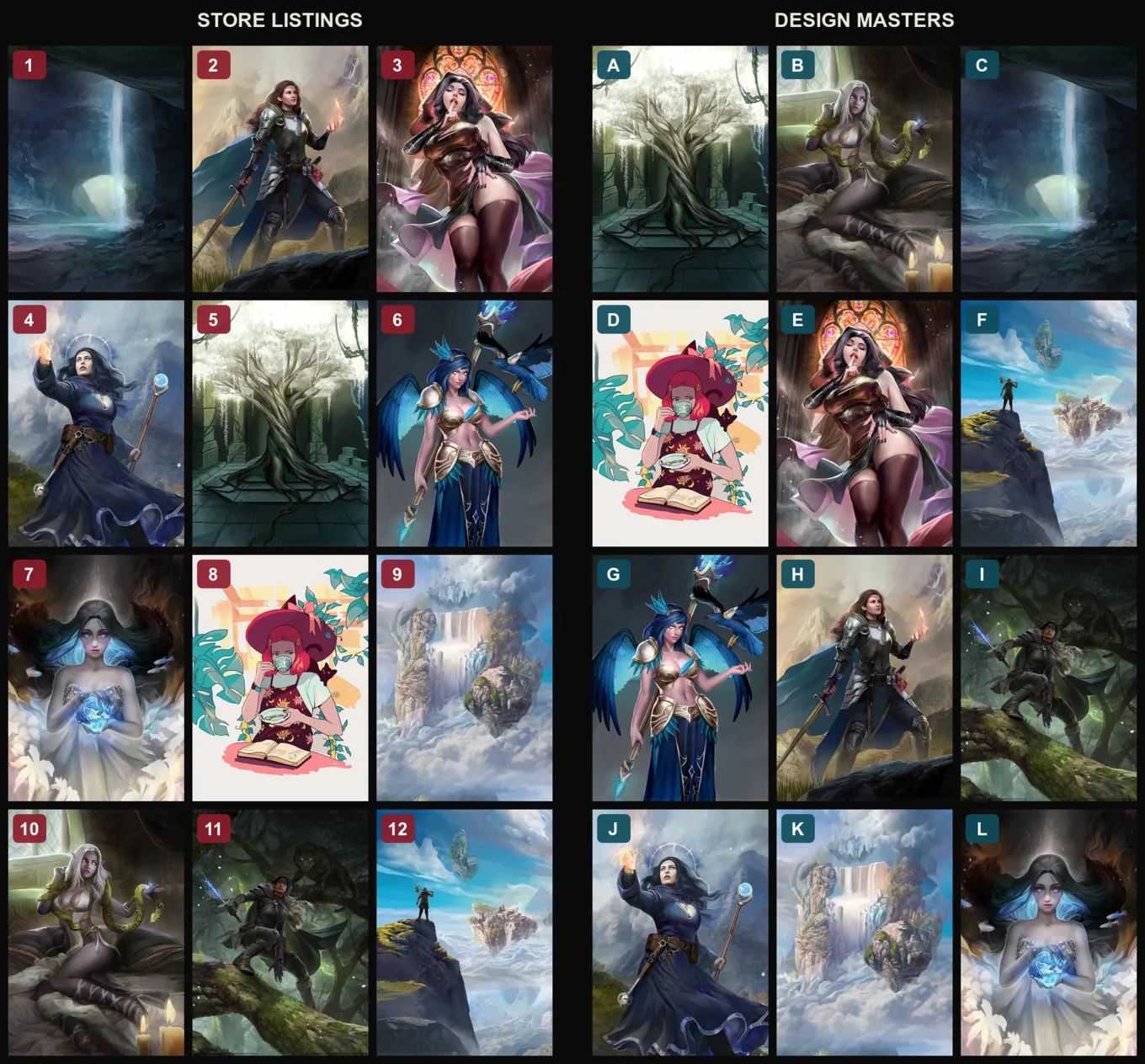
Here's the shape of the job, recreated with artwork from Clayscence, one of TCG Bling's partner artists (shown with permission, and the only artist whose work appears in this post). Store listings on the left, the same artworks shuffled on the right, and the question of which is which:
The obvious approaches, and how they failed
First attempt was perceptual hashing (pHash, the classic trick where similar images produce similar fingerprints). It's free, it's instant, and it got embarrassed almost immediately. A product photo is the artwork wearing a costume: ornate frames, title banners, stat boxes. Two different paintings in the same frame style hashed closer together than the same painting with and without its frame. The fingerprint was mostly fingerprinting the costume.
Second attempt was the honest one: a vision model. We used Claude Haiku, Anthropic's smallest and cheapest tier, showing it one product photo alongside an artist's candidate artworks and asking which of these is under that frame? And it worked. Haiku looks through the framing the way a person does. It came back with the right answer, a confidence score, and a one-line reason.
It also needed one API call per product. A few thousand products, each call carrying a stack of candidate images, against vision-API rate limits. The arithmetic wasn't scary money at Haiku prices, but it was slow and throttle-prone, the kind of pipeline that fails at item 1,742 and makes you re-run an afternoon.
The fix was a better question.
One big picture

Instead of a thousand conversations about one product each, we built two montages per artist, exactly the format of the demonstration grid above. Every product photo gets composited into a grid and stamped with a number. Every source artwork gets composited into a second grid and stamped with a letter. Both images go to Haiku in a single message with a single instruction: map numbers to letters.
The model answers with a tidy mapping (1→C, 2→H, 3→E…) plus a confidence per row. One request, hundreds of comparisons. The cost fell off a cliff. What had been a per-product pipeline with backoff logic became two image composites and one API call per artist, with results in seconds.
And accuracy went up. The grid gives the model the whole candidate set at once, so it can reason comparatively ("4 looks like J, and definitely not like A, which is clearly 5") instead of judging each pair in isolation. Same reason a person sorts a photo pile faster spread on a table than dealt one at a time.
The actual lesson: give everything a name
The grid is a cute trick, but the principle underneath is the thing worth stealing, and it applies to every small-model workflow we've built since:
Small models are brilliant at pointing and mediocre at describing. So never ask for a description when a name will do.
Ask Haiku "describe the artwork in this product photo" and you get prose: plausible and unverifiable. Ask it "which letter?" and you get a single token from a closed set, which is either right or wrong, and is checkable by machine. Every degree of freedom you remove from the answer is a place the model can no longer be creatively wrong.
In practice that meant:
- Label both sides, in different alphabets. Products got numbers, artworks got letters. The model physically cannot confuse which set an identifier belongs to, and the output grammar ("7→C") is unambiguous enough to parse with a regex. Same namespace on both sides and you're one fuzzy answer away from chaos.
- Names beat filenames everywhere. Imported artworks arrive as
IMG_4412.jpgand start life as "Design 17". The first time the matcher links one to a product, the system renames it from the product's title, so the catalogue bootstraps its own vocabulary, and every later prompt that mentions "Arcane Ascension" instead of "Design 17" gets better results from the model. Meaningful names are free context. - Ask for confidence and a one-line reason. The reason is the model marking its own homework, so treat it lightly, but it forces a second look at the image and gives the human reviewer a handle. Low-confidence rows go to a person; high-confidence rows go to a spot-check. The reasons make the spot-check fast.
- Keep the evidence. Every montage that gets sent is also saved to disk. When a mapping looks suspicious a week later, you can open the exact picture the model saw. AI pipelines without reviewable artefacts are just vibes with an invoice.
- Dry-run by default. The command prints its proposed mappings and writes nothing. Applying requires an explicit flag. This has saved us more times than I'll admit in print.
The off-by-one that nearly ate an artist

One war story, because it's the gotcha anyone copying this will hit. The labels in a grid are positional: "product 7" means the seventh item in the query that built this montage. We once applied a batch of mappings by hand against a subtly different product query: the original grid was built from unlinked products only, the manual application queried all of them. Every label shifted. The mappings were perfect; the labels they referred to no longer existed.
The fix is structural. The tool that builds the grid is the only thing allowed to translate labels back to database IDs. It keeps the label-to-ID map from the moment of composition and applies results internally. Humans never touch positional labels. If your batching trick involves generated identifiers, the generator and the resolver must be the same code path; anything else is an off-by-one wearing a trench coat.
Where the grid stops working
One artist's catalogue (a thousand-plus listings against more than a hundred artworks) was simply too big for a single montage. Past a point, tiles shrink until you're asking the model to do forensics on thumbnails, and accuracy decays gracefully into guessing.
The answer was to shrink the decision again, with boring pre-work: cluster the listings by title (six framed variants of one card collapse into one decision), rank the candidates with the humble pHash, which sorts a shortlist well even though it failed as a judge, and put a human on the final click. A person with a well-ordered shortlist clears a hundred-odd clusters in an evening. The thousand-listing catalogue was fully linked in a day, and the AI never saw a pixel of it.
That's the part I'd underline twice. "Optimising AI" mostly isn't prompt incantations or upgrading models. It's task design: shrink the answer space, name everything, batch what batches, rank cheaply before judging expensively, keep artefacts, and let humans spend their judgement where it's actually needed. Do that and the cheapest model in the lineup starts punching far above its price tag.
One more constraint shaped all of this: artwork is the artists' livelihood, and it doesn't get shipped to third parties casually. Matching ran per-artist, scoped and reviewed, with the artist's interests front and centre. A related text-only pipeline (deciding which game pieces suit which artwork) runs on Haiku with no images at all, just names and metadata. A surprising amount of "vision" work turns out to be a text problem once everything has a proper name.
TCG Bling is live at tcgbling.com: custom MTG tokens and trading card art from independent artists, including Clayscence, whose artwork illustrates this post with permission. If your business has a matching, cataloguing, or back-office problem that looks like it needs an expensive AI, talk to Deviant Ops first; it might just need a cheap one, pointed well.